Notice: Function _load_textdomain_just_in_time was called incorrectly. Translation loading for the acf domain was triggered too early. This is usually an indicator for some code in the plugin or theme running too early. Translations should be loaded at the init action or later. Please see Debugging in WordPress for more information. (This message was added in version 6.7.0.) in /var/www/vhosts/studiogo.tech/httpdocs/upcloudold/wp-includes/functions.php on line 6131

Deprecated: Creation of dynamic property ACF::$fields is deprecated in /var/www/vhosts/studiogo.tech/httpdocs/upcloudold/wp-content/plugins/advanced-custom-fields-pro/includes/fields.php on line 138

Deprecated: Creation of dynamic property acf_loop::$loops is deprecated in /var/www/vhosts/studiogo.tech/httpdocs/upcloudold/wp-content/plugins/advanced-custom-fields-pro/includes/loop.php on line 28

Deprecated: Creation of dynamic property ACF::$loop is deprecated in /var/www/vhosts/studiogo.tech/httpdocs/upcloudold/wp-content/plugins/advanced-custom-fields-pro/includes/loop.php on line 269

Deprecated: Creation of dynamic property ACF::$revisions is deprecated in /var/www/vhosts/studiogo.tech/httpdocs/upcloudold/wp-content/plugins/advanced-custom-fields-pro/includes/revisions.php on line 397

Deprecated: Creation of dynamic property acf_validation::$errors is deprecated in /var/www/vhosts/studiogo.tech/httpdocs/upcloudold/wp-content/plugins/advanced-custom-fields-pro/includes/validation.php on line 28

Deprecated: Creation of dynamic property ACF::$validation is deprecated in /var/www/vhosts/studiogo.tech/httpdocs/upcloudold/wp-content/plugins/advanced-custom-fields-pro/includes/validation.php on line 214

Deprecated: Creation of dynamic property acf_form_customizer::$preview_values is deprecated in /var/www/vhosts/studiogo.tech/httpdocs/upcloudold/wp-content/plugins/advanced-custom-fields-pro/includes/forms/form-customizer.php on line 28

Deprecated: Creation of dynamic property acf_form_customizer::$preview_fields is deprecated in /var/www/vhosts/studiogo.tech/httpdocs/upcloudold/wp-content/plugins/advanced-custom-fields-pro/includes/forms/form-customizer.php on line 29

Deprecated: Creation of dynamic property acf_form_customizer::$preview_errors is deprecated in /var/www/vhosts/studiogo.tech/httpdocs/upcloudold/wp-content/plugins/advanced-custom-fields-pro/includes/forms/form-customizer.php on line 30

Deprecated: Creation of dynamic property ACF::$form_front is deprecated in /var/www/vhosts/studiogo.tech/httpdocs/upcloudold/wp-content/plugins/advanced-custom-fields-pro/includes/forms/form-front.php on line 598

Deprecated: Creation of dynamic property acf_form_widget::$preview_values is deprecated in /var/www/vhosts/studiogo.tech/httpdocs/upcloudold/wp-content/plugins/advanced-custom-fields-pro/includes/forms/form-widget.php on line 34

Deprecated: Creation of dynamic property acf_form_widget::$preview_reference is deprecated in /var/www/vhosts/studiogo.tech/httpdocs/upcloudold/wp-content/plugins/advanced-custom-fields-pro/includes/forms/form-widget.php on line 35

Deprecated: Creation of dynamic property acf_form_widget::$preview_errors is deprecated in /var/www/vhosts/studiogo.tech/httpdocs/upcloudold/wp-content/plugins/advanced-custom-fields-pro/includes/forms/form-widget.php on line 36

Notice: Function _load_textdomain_just_in_time was called incorrectly. Translation loading for the all-in-one-wp-migration domain was triggered too early. This is usually an indicator for some code in the plugin or theme running too early. Translations should be loaded at the init action or later. Please see Debugging in WordPress for more information. (This message was added in version 6.7.0.) in /var/www/vhosts/studiogo.tech/httpdocs/upcloudold/wp-includes/functions.php on line 6131

Deprecated: str_replace(): Passing null to parameter #3 ($subject) of type array|string is deprecated in /var/www/vhosts/studiogo.tech/httpdocs/upcloudold/wp-content/plugins/wp-super-cache/wp-cache-phase2.php on line 54

Deprecated: strtolower(): Passing null to parameter #1 ($string) of type string is deprecated in /var/www/vhosts/studiogo.tech/httpdocs/upcloudold/wp-content/plugins/wp-super-cache/wp-cache-phase2.php on line 828

Notice: Function _load_textdomain_just_in_time was called incorrectly. Translation loading for the rocket domain was triggered too early. This is usually an indicator for some code in the plugin or theme running too early. Translations should be loaded at the init action or later. Please see Debugging in WordPress for more information. (This message was added in version 6.7.0.) in /var/www/vhosts/studiogo.tech/httpdocs/upcloudold/wp-includes/functions.php on line 6131

Deprecated: Creation of dynamic property acf_field_oembed::$width is deprecated in /var/www/vhosts/studiogo.tech/httpdocs/upcloudold/wp-content/plugins/advanced-custom-fields-pro/includes/fields/class-acf-field-oembed.php on line 31

Deprecated: Creation of dynamic property acf_field_oembed::$height is deprecated in /var/www/vhosts/studiogo.tech/httpdocs/upcloudold/wp-content/plugins/advanced-custom-fields-pro/includes/fields/class-acf-field-oembed.php on line 32

Deprecated: Creation of dynamic property acf_field_google_map::$default_values is deprecated in /var/www/vhosts/studiogo.tech/httpdocs/upcloudold/wp-content/plugins/advanced-custom-fields-pro/includes/fields/class-acf-field-google-map.php on line 33

Deprecated: Creation of dynamic property acf_field__group::$have_rows is deprecated in /var/www/vhosts/studiogo.tech/httpdocs/upcloudold/wp-content/plugins/advanced-custom-fields-pro/includes/fields/class-acf-field-group.php on line 31

Deprecated: Creation of dynamic property acf_field_clone::$cloning is deprecated in /var/www/vhosts/studiogo.tech/httpdocs/upcloudold/wp-content/plugins/advanced-custom-fields-pro/pro/fields/class-acf-field-clone.php on line 34

Deprecated: Creation of dynamic property acf_field_clone::$have_rows is deprecated in /var/www/vhosts/studiogo.tech/httpdocs/upcloudold/wp-content/plugins/advanced-custom-fields-pro/pro/fields/class-acf-field-clone.php on line 35

Deprecated: Creation of dynamic property jh_acf_field_table::$settings is deprecated in /var/www/vhosts/studiogo.tech/httpdocs/upcloudold/wp-content/plugins/advanced-custom-fields-table-field/class-jh-acf-field-table.php on line 23
UpCloud

How to automate UpCloud backups using SimpleBackups

benefit-4

SimpleBackups is an all-in-one website & database backup automation service built for the cloud. It offers extensive support for databases such as MySQL, MongoDB and PostgreSQL as well as most cloud storage options. SimpleBackups also allows you to automate your Cloud Server backups on UpCloud.

Using SimpleBackups, you are able to take snapshots, automatically on your own terms. Whether you need to take backups daily, weekly, every couple of hours or on-demand, everything is possible using the SimpleBackups API. You will also have the option to choose the number of snapshots to keep on your provider to save on snapshot storage costs.

Prerequisites

To be able to utilise the services on both UpCloud and SimpleBackups, you will need to register on both. Begin by signing up for an account if you haven’t yet.

Now, let’s get started!

1. Creating new UpCloud API credentials

SimpleBackups can integrate directly with your UpCloud account using the UpCloud API. To start, we will create unique API credentials on UpCloud that will allow us to automate UpCloud snapshots from the SimpleBackups dashboard.

First, log in to your UpCloud Control Panel and head over to the People section.
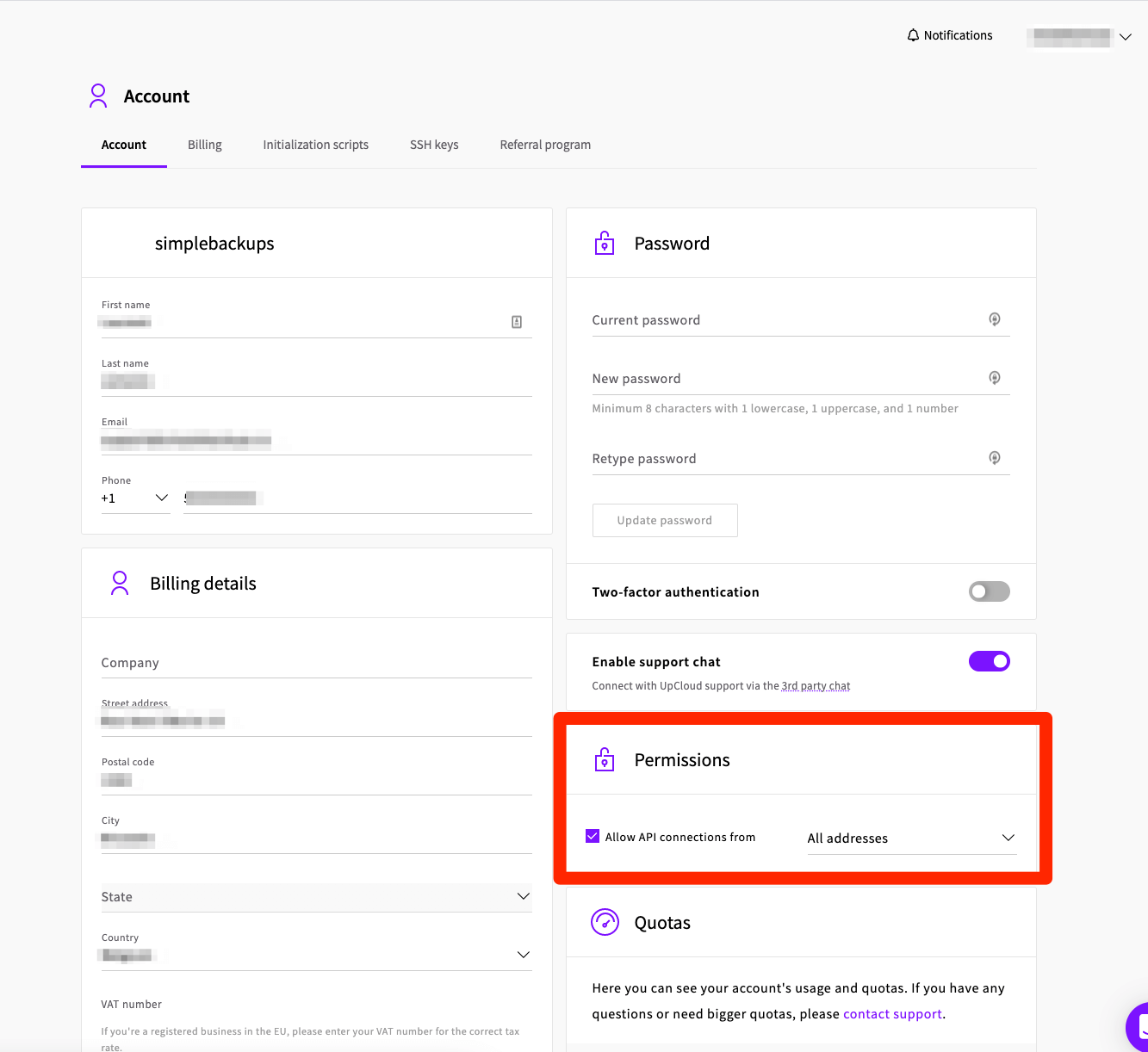
  1. In the People section, click the Add button
  2. Choose a username for the API account
  3. Enter the contact details for your API credentials
  4. Set the API password by default, the API account will have full permissions to any resources it creates but no access to existing servers or storage. You can grant additional permissions as needed using the server, storage, and tag access options.
  5. Under Permissions set API Connections to All addresses OR whitelist all SimpleBackups IP by selecting ‘Address range’
Creating UpCloud API account for SimpleBackups

The API Username and Password are required for connecting your UpCloud account to SimpleBackups. This allows you to integrate services without sacrificing security by creating unique API credentials for each service that needs access to your UpCloud account.

You can learn more at the guide for gettting started with UpCloud API .

Note that you cannot enable two-factor authentication on API accounts which is why APIs need to use their own credentials.

Next, log in to your SimpleBackups account, then head to the snapshot creation section.

2. Connecting your UpCloud account

Let’s now connect your UpCloud account to SimpleBackup. Log in to your SimpleBackups account.

Connect your UpCloud account
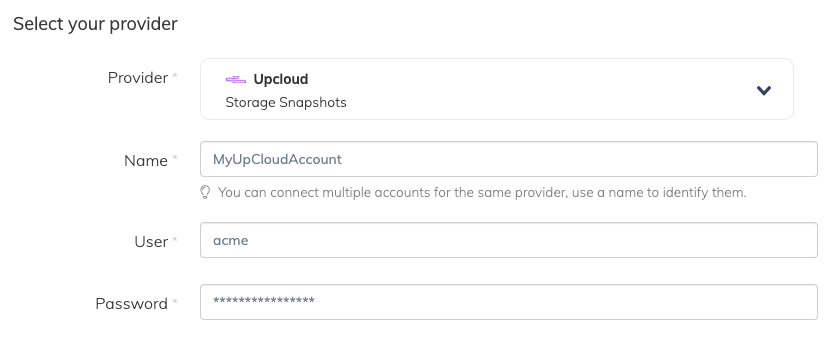
  • Name: the name we’ll use to identify your UpCloud account in SimpleBackups
  • User: your UpCloud API username
  • Password: your UpCloud API password
Connecting UpCloud account on SimpleBackups

Choose your UpCloud account

From the list, choose the UpCloud account your Cloud Servers reside on. You may add as many UpCloud accounts as you need under your SimpleBackups account and manage all backups from a single dashboard.

Choose the UpCloud server or volume resource

You can choose either a Cloud Server under the Resource Type or a specific storage volume. The Resource dropdown will be populated by all the UpCloud resources accessible under your UpCloud API credentials.

3. Creating an UpCloud backup job

Now that you’ve connected your UpCloud account, you can finish creating the backup job. Continue with the next step.

Set the retention you need

Define the backup Retention. This is the number of individual snapshots SimpleBackups will keep. When a maximum number of snapshots already exists, taking a new snapshot will automatically prune the oldest one on the list.

Save the snapshot backup job

Finally, give your snapshot backup job a friendly name you can recognise it by.

Then click the Create Snapshot button.
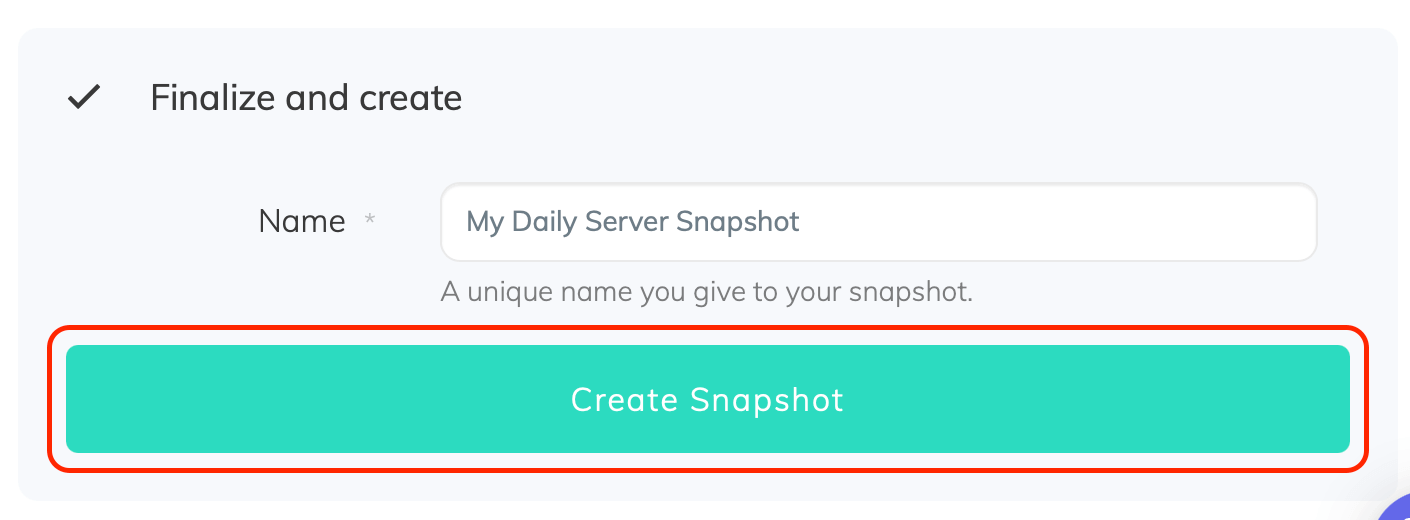
Creating snapshot backup on UpCloud

Congratulations, you now have an automated UpCloud snapshot backup!

Run the backup job once manually using the Run snapshot button from the snapshots list. Running the job will trigger your first snapshot backup!

No comments yet.

Leave a Reply

Your email address will not be published. Required fields are marked *

Find out what makes our Cloud servers so boring

No? Experience the UpCloud special treatment and try our next generation, high-performance and resilient Cloud servers with no drama, worries or commitment.