Notice: Function _load_textdomain_just_in_time was called incorrectly. Translation loading for the acf domain was triggered too early. This is usually an indicator for some code in the plugin or theme running too early. Translations should be loaded at the init action or later. Please see Debugging in WordPress for more information. (This message was added in version 6.7.0.) in /var/www/vhosts/studiogo.tech/httpdocs/upcloudold/wp-includes/functions.php on line 6131

Deprecated: Creation of dynamic property ACF::$fields is deprecated in /var/www/vhosts/studiogo.tech/httpdocs/upcloudold/wp-content/plugins/advanced-custom-fields-pro/includes/fields.php on line 138

Deprecated: Creation of dynamic property acf_loop::$loops is deprecated in /var/www/vhosts/studiogo.tech/httpdocs/upcloudold/wp-content/plugins/advanced-custom-fields-pro/includes/loop.php on line 28

Deprecated: Creation of dynamic property ACF::$loop is deprecated in /var/www/vhosts/studiogo.tech/httpdocs/upcloudold/wp-content/plugins/advanced-custom-fields-pro/includes/loop.php on line 269

Deprecated: Creation of dynamic property ACF::$revisions is deprecated in /var/www/vhosts/studiogo.tech/httpdocs/upcloudold/wp-content/plugins/advanced-custom-fields-pro/includes/revisions.php on line 397

Deprecated: Creation of dynamic property acf_validation::$errors is deprecated in /var/www/vhosts/studiogo.tech/httpdocs/upcloudold/wp-content/plugins/advanced-custom-fields-pro/includes/validation.php on line 28

Deprecated: Creation of dynamic property ACF::$validation is deprecated in /var/www/vhosts/studiogo.tech/httpdocs/upcloudold/wp-content/plugins/advanced-custom-fields-pro/includes/validation.php on line 214

Deprecated: Creation of dynamic property acf_form_customizer::$preview_values is deprecated in /var/www/vhosts/studiogo.tech/httpdocs/upcloudold/wp-content/plugins/advanced-custom-fields-pro/includes/forms/form-customizer.php on line 28

Deprecated: Creation of dynamic property acf_form_customizer::$preview_fields is deprecated in /var/www/vhosts/studiogo.tech/httpdocs/upcloudold/wp-content/plugins/advanced-custom-fields-pro/includes/forms/form-customizer.php on line 29

Deprecated: Creation of dynamic property acf_form_customizer::$preview_errors is deprecated in /var/www/vhosts/studiogo.tech/httpdocs/upcloudold/wp-content/plugins/advanced-custom-fields-pro/includes/forms/form-customizer.php on line 30

Deprecated: Creation of dynamic property ACF::$form_front is deprecated in /var/www/vhosts/studiogo.tech/httpdocs/upcloudold/wp-content/plugins/advanced-custom-fields-pro/includes/forms/form-front.php on line 598

Deprecated: Creation of dynamic property acf_form_widget::$preview_values is deprecated in /var/www/vhosts/studiogo.tech/httpdocs/upcloudold/wp-content/plugins/advanced-custom-fields-pro/includes/forms/form-widget.php on line 34

Deprecated: Creation of dynamic property acf_form_widget::$preview_reference is deprecated in /var/www/vhosts/studiogo.tech/httpdocs/upcloudold/wp-content/plugins/advanced-custom-fields-pro/includes/forms/form-widget.php on line 35

Deprecated: Creation of dynamic property acf_form_widget::$preview_errors is deprecated in /var/www/vhosts/studiogo.tech/httpdocs/upcloudold/wp-content/plugins/advanced-custom-fields-pro/includes/forms/form-widget.php on line 36

Notice: Function _load_textdomain_just_in_time was called incorrectly. Translation loading for the all-in-one-wp-migration domain was triggered too early. This is usually an indicator for some code in the plugin or theme running too early. Translations should be loaded at the init action or later. Please see Debugging in WordPress for more information. (This message was added in version 6.7.0.) in /var/www/vhosts/studiogo.tech/httpdocs/upcloudold/wp-includes/functions.php on line 6131

Deprecated: str_replace(): Passing null to parameter #3 ($subject) of type array|string is deprecated in /var/www/vhosts/studiogo.tech/httpdocs/upcloudold/wp-content/plugins/wp-super-cache/wp-cache-phase2.php on line 54

Deprecated: strtolower(): Passing null to parameter #1 ($string) of type string is deprecated in /var/www/vhosts/studiogo.tech/httpdocs/upcloudold/wp-content/plugins/wp-super-cache/wp-cache-phase2.php on line 828

Notice: Function _load_textdomain_just_in_time was called incorrectly. Translation loading for the rocket domain was triggered too early. This is usually an indicator for some code in the plugin or theme running too early. Translations should be loaded at the init action or later. Please see Debugging in WordPress for more information. (This message was added in version 6.7.0.) in /var/www/vhosts/studiogo.tech/httpdocs/upcloudold/wp-includes/functions.php on line 6131

Deprecated: Creation of dynamic property acf_field_oembed::$width is deprecated in /var/www/vhosts/studiogo.tech/httpdocs/upcloudold/wp-content/plugins/advanced-custom-fields-pro/includes/fields/class-acf-field-oembed.php on line 31

Deprecated: Creation of dynamic property acf_field_oembed::$height is deprecated in /var/www/vhosts/studiogo.tech/httpdocs/upcloudold/wp-content/plugins/advanced-custom-fields-pro/includes/fields/class-acf-field-oembed.php on line 32

Deprecated: Creation of dynamic property acf_field_google_map::$default_values is deprecated in /var/www/vhosts/studiogo.tech/httpdocs/upcloudold/wp-content/plugins/advanced-custom-fields-pro/includes/fields/class-acf-field-google-map.php on line 33

Deprecated: Creation of dynamic property acf_field__group::$have_rows is deprecated in /var/www/vhosts/studiogo.tech/httpdocs/upcloudold/wp-content/plugins/advanced-custom-fields-pro/includes/fields/class-acf-field-group.php on line 31

Deprecated: Creation of dynamic property acf_field_clone::$cloning is deprecated in /var/www/vhosts/studiogo.tech/httpdocs/upcloudold/wp-content/plugins/advanced-custom-fields-pro/pro/fields/class-acf-field-clone.php on line 34

Deprecated: Creation of dynamic property acf_field_clone::$have_rows is deprecated in /var/www/vhosts/studiogo.tech/httpdocs/upcloudold/wp-content/plugins/advanced-custom-fields-pro/pro/fields/class-acf-field-clone.php on line 35

Deprecated: Creation of dynamic property jh_acf_field_table::$settings is deprecated in /var/www/vhosts/studiogo.tech/httpdocs/upcloudold/wp-content/plugins/advanced-custom-fields-table-field/class-jh-acf-field-table.php on line 23
UpCloud

Booting a server with live CD

benefit-4

A live CD is a complete operating system bootable directly from portable media such as CDROMs. Rather than loading the OS from the system storage, with a live CD, you can quickly test different operating systems without having to spend the time to go through the installation process. Many Linux distributions offer downloadable disk images for creating your own live CD which can also be useful in system recovery and repair.

Running a server from a live CD requires you to create a new storage device to copy the live CD image onto, configure the storage disk as a CDROM, and then boot up your server from the CDROM device.

Deploying a new server

Start off by creating a new cloud server of your choice at your UpCloud Control Panel. The instructions in this guide are directed at a Linux system but the process would be largely the same on any server OS.

Make the required configurations by:
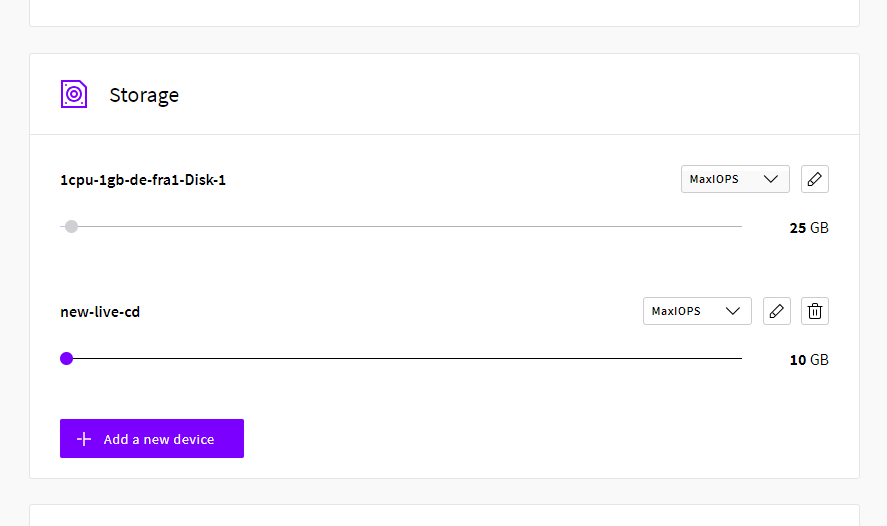
  • Selecting the location where you wish to have the live CD available
  • Choose the configuration, the 1CPU and 1GB General Purpose plan works fine
  • Add a second 10GB disk by clicking the text below the first.
New live CD server
  • Pick the OS you are comfortable with for a one-time boot
  • Include any SSH keys you wish if available to allow password-free login
  • Naming your server and giving it a description.
  • Confirm your selections and click the Deploy button.

Once your server has finished deploying, you can log in with SSH using any keys selected at deployment or using the root password.

Creating a live CD storage

When logged in as a root privileged user, check that the second storage disk is available.

lsblk  NAME   MAJ:MIN RM SIZE RO TYPE MOUNTPOINT vda    253:0    0  25G  0 disk `-vda1 253:1    0  25G  0 part / vdb    253:16   0  10G  0 disk

The first disk will show up with the regular operating system partition which is mounted at the root and the second disk should be a simple empty disk with no partitions.

Download a live CD image to the server, for example, using curl utility tool that is available on most distributions by default.

curl -o ~/image.iso https://example.com/live-cd-image.iso

When you have the desired live CD image saved on the server, copy the file contents to the empty storage device with the following command. Make sure that the image name and the target disk are set correctly and that the image is copied directly.

sudo dd if=~/image.iso of=/dev/vdb bs=16M oflag=direct

The copy process won’t take long.

Once the live CD image has been successfully copied to the second disk, shut down the server again either at your UpCloud control panel or with the command below.

sudo shutdown -h now

With the server powered down, continue on with the last steps in booting from a live CD.

Booting from a CDROM storage

Now that you have a new live CD available, you will probably want to boot from it. This requires you to set a CDROM as the first device in the server boot order and configure the live CD storage device as CDROM.

First, go to the overview tab in your server settings and scroll to the bottom of the page. Open the Optionals by clicking the text, then select cdrom as the first boot device and click the Save changes button.
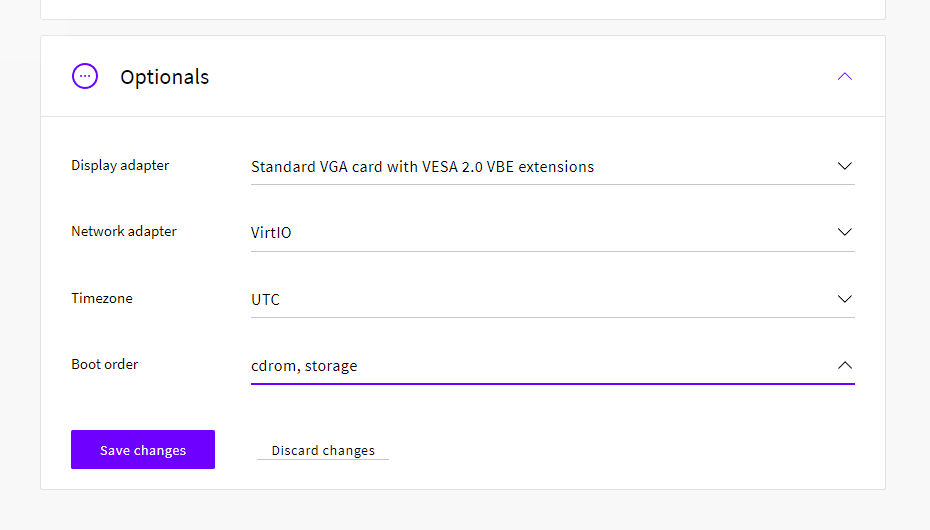
Boot order

Next, go to the Storage tab in your server settings and check the second disk device you copied the live CD image.

Change the live CD storage device controller to the CDROM and click the Save changes button.
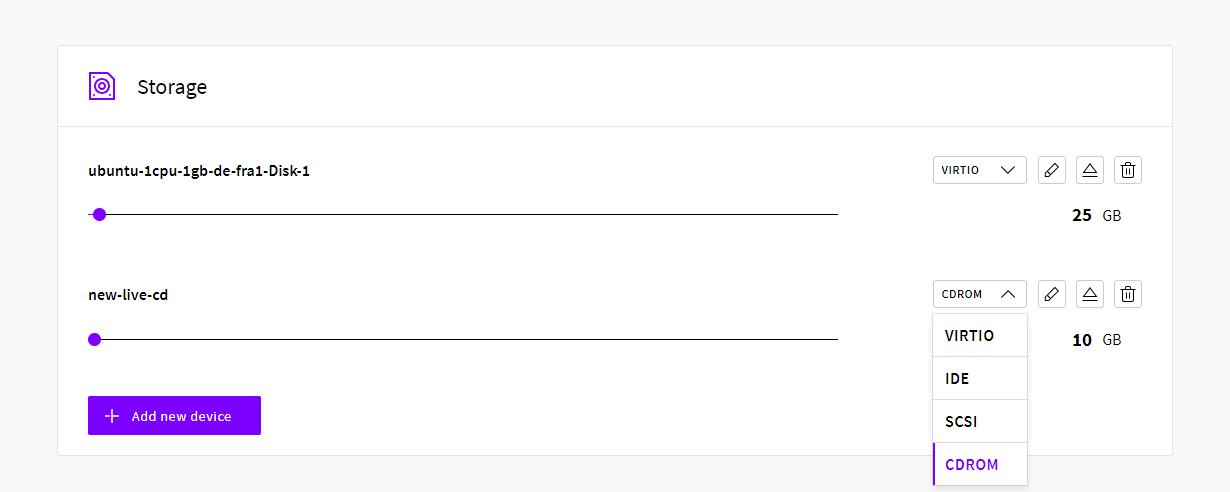
Set type CDROM

You can then start the server and boot into your new live CD!

Depending on the live CD you might need to log into the server with either the web console at your UpCloud control panel or using a VNC connection. You can find more information about how to use these methods in our guide about connecting to your server.


No comments yet.

Find out what makes our Cloud servers so boring

No? Experience the UpCloud special treatment and try our next generation, high-performance and resilient Cloud servers with no drama, worries or commitment.