Notice: Function _load_textdomain_just_in_time was called incorrectly. Translation loading for the acf domain was triggered too early. This is usually an indicator for some code in the plugin or theme running too early. Translations should be loaded at the init action or later. Please see Debugging in WordPress for more information. (This message was added in version 6.7.0.) in /var/www/vhosts/studiogo.tech/httpdocs/upcloudold/wp-includes/functions.php on line 6131

Deprecated: Creation of dynamic property ACF::$fields is deprecated in /var/www/vhosts/studiogo.tech/httpdocs/upcloudold/wp-content/plugins/advanced-custom-fields-pro/includes/fields.php on line 138

Deprecated: Creation of dynamic property acf_loop::$loops is deprecated in /var/www/vhosts/studiogo.tech/httpdocs/upcloudold/wp-content/plugins/advanced-custom-fields-pro/includes/loop.php on line 28

Deprecated: Creation of dynamic property ACF::$loop is deprecated in /var/www/vhosts/studiogo.tech/httpdocs/upcloudold/wp-content/plugins/advanced-custom-fields-pro/includes/loop.php on line 269

Deprecated: Creation of dynamic property ACF::$revisions is deprecated in /var/www/vhosts/studiogo.tech/httpdocs/upcloudold/wp-content/plugins/advanced-custom-fields-pro/includes/revisions.php on line 397

Deprecated: Creation of dynamic property acf_validation::$errors is deprecated in /var/www/vhosts/studiogo.tech/httpdocs/upcloudold/wp-content/plugins/advanced-custom-fields-pro/includes/validation.php on line 28

Deprecated: Creation of dynamic property ACF::$validation is deprecated in /var/www/vhosts/studiogo.tech/httpdocs/upcloudold/wp-content/plugins/advanced-custom-fields-pro/includes/validation.php on line 214

Deprecated: Creation of dynamic property acf_form_customizer::$preview_values is deprecated in /var/www/vhosts/studiogo.tech/httpdocs/upcloudold/wp-content/plugins/advanced-custom-fields-pro/includes/forms/form-customizer.php on line 28

Deprecated: Creation of dynamic property acf_form_customizer::$preview_fields is deprecated in /var/www/vhosts/studiogo.tech/httpdocs/upcloudold/wp-content/plugins/advanced-custom-fields-pro/includes/forms/form-customizer.php on line 29

Deprecated: Creation of dynamic property acf_form_customizer::$preview_errors is deprecated in /var/www/vhosts/studiogo.tech/httpdocs/upcloudold/wp-content/plugins/advanced-custom-fields-pro/includes/forms/form-customizer.php on line 30

Deprecated: Creation of dynamic property ACF::$form_front is deprecated in /var/www/vhosts/studiogo.tech/httpdocs/upcloudold/wp-content/plugins/advanced-custom-fields-pro/includes/forms/form-front.php on line 598

Deprecated: Creation of dynamic property acf_form_widget::$preview_values is deprecated in /var/www/vhosts/studiogo.tech/httpdocs/upcloudold/wp-content/plugins/advanced-custom-fields-pro/includes/forms/form-widget.php on line 34

Deprecated: Creation of dynamic property acf_form_widget::$preview_reference is deprecated in /var/www/vhosts/studiogo.tech/httpdocs/upcloudold/wp-content/plugins/advanced-custom-fields-pro/includes/forms/form-widget.php on line 35

Deprecated: Creation of dynamic property acf_form_widget::$preview_errors is deprecated in /var/www/vhosts/studiogo.tech/httpdocs/upcloudold/wp-content/plugins/advanced-custom-fields-pro/includes/forms/form-widget.php on line 36

Notice: Function _load_textdomain_just_in_time was called incorrectly. Translation loading for the all-in-one-wp-migration domain was triggered too early. This is usually an indicator for some code in the plugin or theme running too early. Translations should be loaded at the init action or later. Please see Debugging in WordPress for more information. (This message was added in version 6.7.0.) in /var/www/vhosts/studiogo.tech/httpdocs/upcloudold/wp-includes/functions.php on line 6131

Deprecated: str_replace(): Passing null to parameter #3 ($subject) of type array|string is deprecated in /var/www/vhosts/studiogo.tech/httpdocs/upcloudold/wp-content/plugins/wp-super-cache/wp-cache-phase2.php on line 54

Deprecated: strtolower(): Passing null to parameter #1 ($string) of type string is deprecated in /var/www/vhosts/studiogo.tech/httpdocs/upcloudold/wp-content/plugins/wp-super-cache/wp-cache-phase2.php on line 828

Notice: Function _load_textdomain_just_in_time was called incorrectly. Translation loading for the rocket domain was triggered too early. This is usually an indicator for some code in the plugin or theme running too early. Translations should be loaded at the init action or later. Please see Debugging in WordPress for more information. (This message was added in version 6.7.0.) in /var/www/vhosts/studiogo.tech/httpdocs/upcloudold/wp-includes/functions.php on line 6131

Deprecated: Creation of dynamic property acf_field_oembed::$width is deprecated in /var/www/vhosts/studiogo.tech/httpdocs/upcloudold/wp-content/plugins/advanced-custom-fields-pro/includes/fields/class-acf-field-oembed.php on line 31

Deprecated: Creation of dynamic property acf_field_oembed::$height is deprecated in /var/www/vhosts/studiogo.tech/httpdocs/upcloudold/wp-content/plugins/advanced-custom-fields-pro/includes/fields/class-acf-field-oembed.php on line 32

Deprecated: Creation of dynamic property acf_field_google_map::$default_values is deprecated in /var/www/vhosts/studiogo.tech/httpdocs/upcloudold/wp-content/plugins/advanced-custom-fields-pro/includes/fields/class-acf-field-google-map.php on line 33

Deprecated: Creation of dynamic property acf_field__group::$have_rows is deprecated in /var/www/vhosts/studiogo.tech/httpdocs/upcloudold/wp-content/plugins/advanced-custom-fields-pro/includes/fields/class-acf-field-group.php on line 31

Deprecated: Creation of dynamic property acf_field_clone::$cloning is deprecated in /var/www/vhosts/studiogo.tech/httpdocs/upcloudold/wp-content/plugins/advanced-custom-fields-pro/pro/fields/class-acf-field-clone.php on line 34

Deprecated: Creation of dynamic property acf_field_clone::$have_rows is deprecated in /var/www/vhosts/studiogo.tech/httpdocs/upcloudold/wp-content/plugins/advanced-custom-fields-pro/pro/fields/class-acf-field-clone.php on line 35

Deprecated: Creation of dynamic property jh_acf_field_table::$settings is deprecated in /var/www/vhosts/studiogo.tech/httpdocs/upcloudold/wp-content/plugins/advanced-custom-fields-table-field/class-jh-acf-field-table.php on line 23
UpCloud

How to export cloud resources and import to Terraform

benefit-4

Terraform is a simple yet powerful open-source infrastructure management tool that allows you to build, change, and version infrastructure safely and efficiently. While Terraform is great for building new cloud services, you can now also easily export UpCloud Control Panel managed configurations for importing to Terraform!

Terraform logo

In this guide, we will show you how to export your cloud services as ready-to-use Terraform configuration files and how to import these into Terraform. The process is really quick and easy allowing anyone to migrate to managing their cloud infrastructure using Terraform.

Getting started with Terraform

Managing your cloud infrastructure on UpCloud is really straightforward using our Terraform provider module. It's publicly available on our GitHub as well as on Terraform's Registry which makes it simple to install. If you are new to Terraform on UpCloud or Terraform in general, have a look at our getting started tutorial to install Terraform and set up your Terraform configuration directory.

Exporting cloud resources

The Terraform command-line tool allows importing existing resources simply by providing it with matching configurations. However, this could be quite cumbersome even with smaller services let alone on 100+ cloud server infrastructure! To solve this, we offer an option to programmatically generate Terraform configuration from your existing UpCloud services.

To get started, head over to your UpCloud Control Panel and the Terraform section. Then click the Export my infrastructure button.
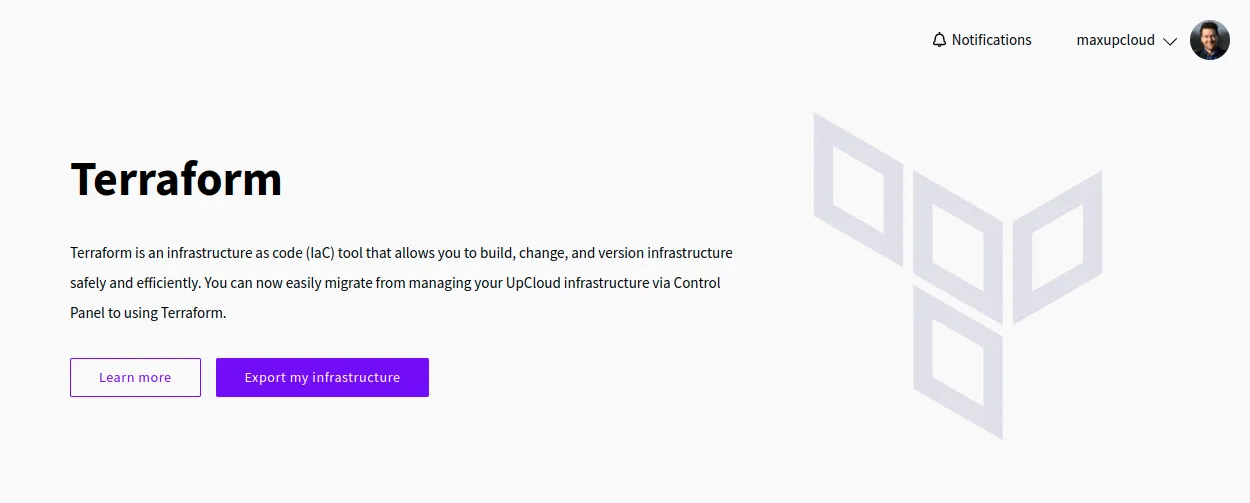
Exporting cloud resources for Terraform

Select the resources you wish to manage via Terraform from now on. Note that selecting a resource will automatically select all of its dependencies.

Your cloud resources are arranged according to their types; servers, networks, databases, for example.
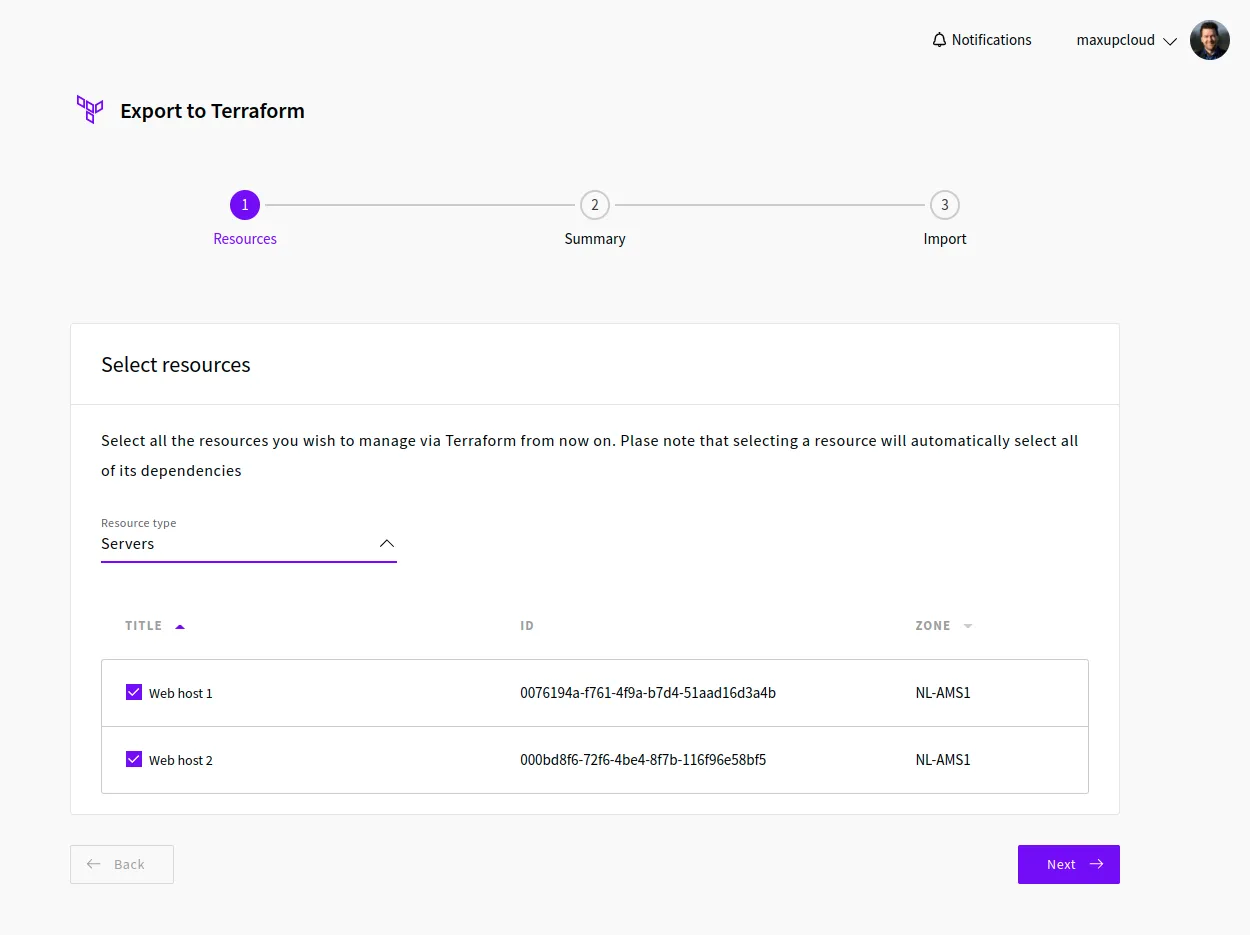
Selecting cloud resources for export

When you've made your selections, click the Next button to continue.

Lastly, confirm you have selected the cloud resources you want to export. Then click the Next button to run the export process.
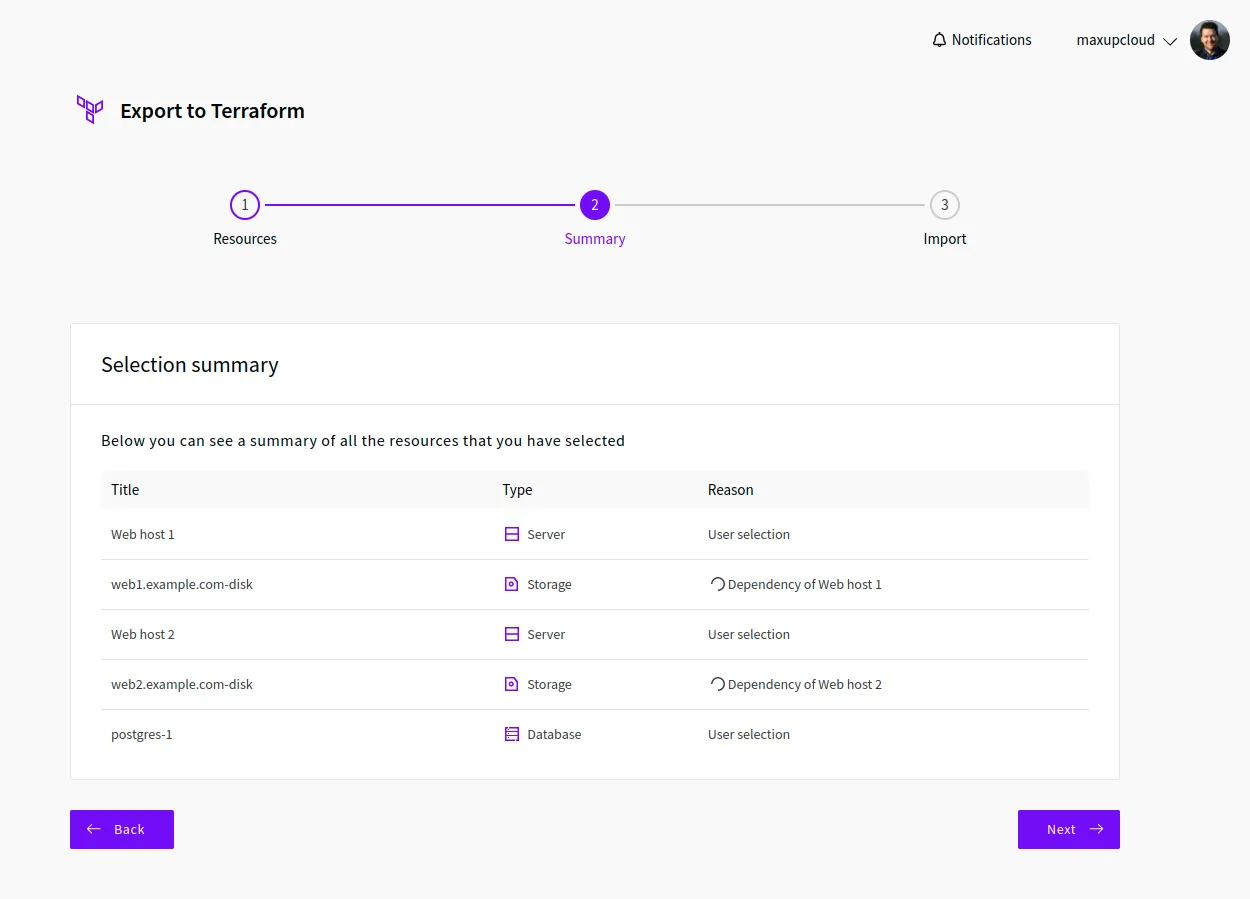
Summary for cloud resources to be exported

Once you've exported cloud resources at your UpCloud Control Panel, you will be presented with a Terraform configuration file and instructions on how to import it. Proceed to the next section to continue to import your resources to Terraform.

Importing Terraform configurations

The exported configuration is presented in a single file and can be copied as such. However, you can also separate your resources into their own files.

Following our tutorial on how to get started with Terraform, you might have already created a configuration directory. If not, do so now by simply creating a folder where you wish to save your Terraform configuration. For example in your home directory.

mkdir -p ~/terraform/prod

Then create a file called main.tf in that directory and copy your Terraform configuration to it.

Make sure you include the terraform and provider sections as shown below.
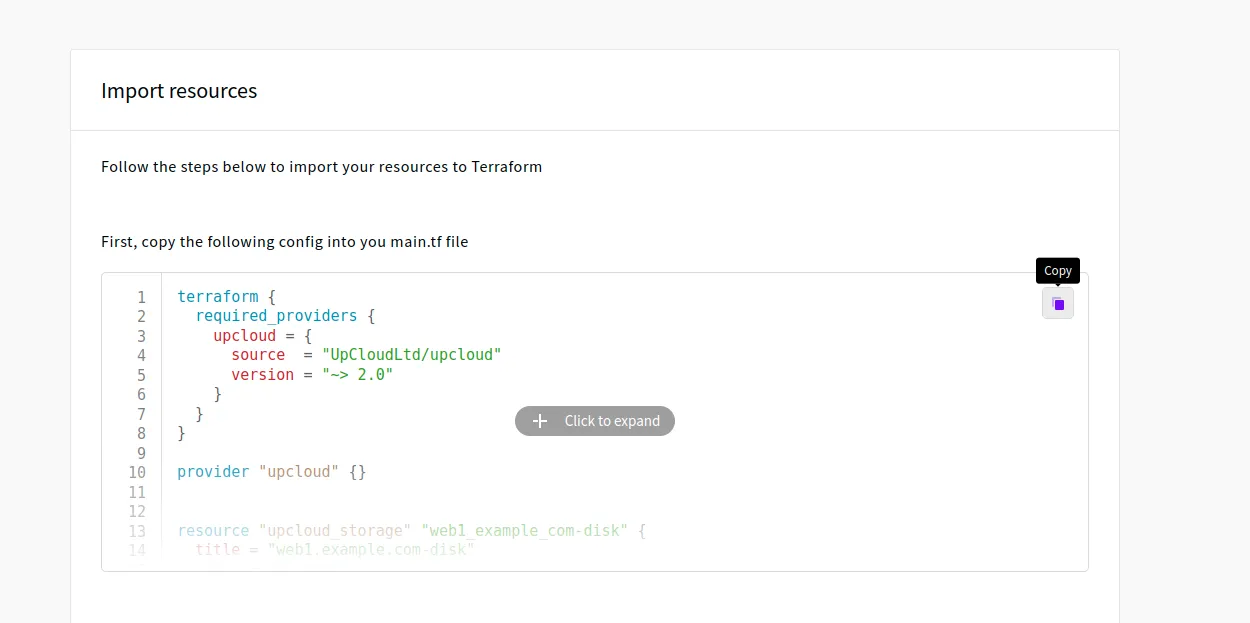
Exported Terraform configuration

When you've saved your Terraform configuration, you will need to initialise your Terraform directory.

terraform init

Next, run the import commands as displayed in the Terraform import instructions in your UpCloud Control Panel. The example below shows a list of commands. Note the && at the end of each line meaning the whole list can be executed as one command.
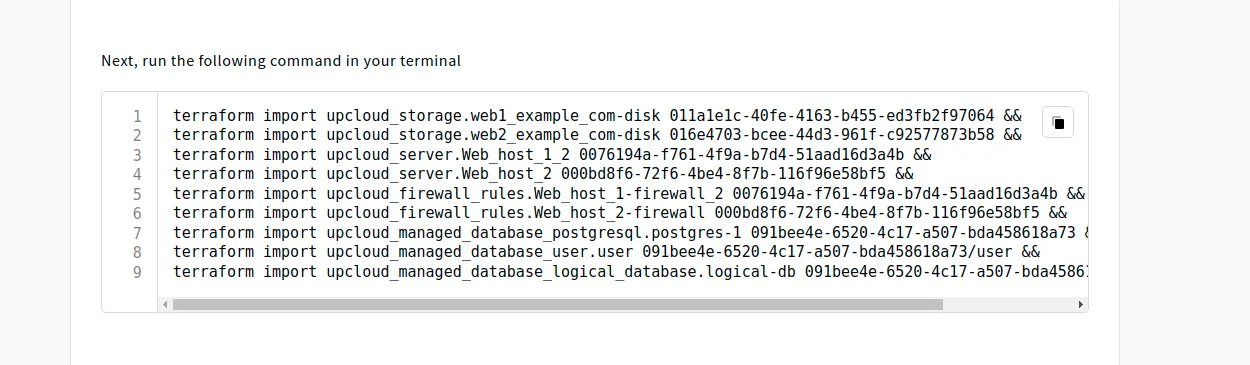
Terraform import commands
When running the import commands, you should see a confirmation like the output example underneath for each import.

Import successful!  The resources that were imported are shown above. These resources are now in your Terraform state and will henceforth be managed by Terraform.

Finally, test the import by running the terraform plan command to verify your configuration.

terraform plan

If you then want to make changes to your cloud services, simply amend the Terraform configuration files and apply the changes.

terraform apply

That's it! You should now have successfully exported at least some of your cloud resources and imported them to Terraform.

Conclusions

Importing your cloud resources to Terraform allows you to codify your infrastructure for easier maintenance and management. Furthermore, the export feature at your UpCloud Control Panel makes it easier than ever before to get started with Terraform.

After importing your first Terraform config, you might want to learn how to make the most of Terraform. For example, check out our tutorial on how to use Terraform variables to make it quick and easy to modify or replicate your cloud services.


No comments yet.

Leave a Reply

Your email address will not be published. Required fields are marked *

Find out what makes our Cloud servers so boring

No? Experience the UpCloud special treatment and try our next generation, high-performance and resilient Cloud servers with no drama, worries or commitment.