Notice: Function _load_textdomain_just_in_time was called incorrectly. Translation loading for the acf domain was triggered too early. This is usually an indicator for some code in the plugin or theme running too early. Translations should be loaded at the init action or later. Please see Debugging in WordPress for more information. (This message was added in version 6.7.0.) in /var/www/vhosts/studiogo.tech/httpdocs/upcloudold/wp-includes/functions.php on line 6131
Deprecated: Creation of dynamic property ACF::$fields is deprecated in /var/www/vhosts/studiogo.tech/httpdocs/upcloudold/wp-content/plugins/advanced-custom-fields-pro/includes/fields.php on line 138

Deprecated: Creation of dynamic property acf_loop::$loops is deprecated in /var/www/vhosts/studiogo.tech/httpdocs/upcloudold/wp-content/plugins/advanced-custom-fields-pro/includes/loop.php on line 28

Deprecated: Creation of dynamic property ACF::$loop is deprecated in /var/www/vhosts/studiogo.tech/httpdocs/upcloudold/wp-content/plugins/advanced-custom-fields-pro/includes/loop.php on line 269

Deprecated: Creation of dynamic property ACF::$revisions is deprecated in /var/www/vhosts/studiogo.tech/httpdocs/upcloudold/wp-content/plugins/advanced-custom-fields-pro/includes/revisions.php on line 397

Deprecated: Creation of dynamic property acf_validation::$errors is deprecated in /var/www/vhosts/studiogo.tech/httpdocs/upcloudold/wp-content/plugins/advanced-custom-fields-pro/includes/validation.php on line 28

Deprecated: Creation of dynamic property ACF::$validation is deprecated in /var/www/vhosts/studiogo.tech/httpdocs/upcloudold/wp-content/plugins/advanced-custom-fields-pro/includes/validation.php on line 214

Deprecated: Creation of dynamic property acf_form_customizer::$preview_values is deprecated in /var/www/vhosts/studiogo.tech/httpdocs/upcloudold/wp-content/plugins/advanced-custom-fields-pro/includes/forms/form-customizer.php on line 28

Deprecated: Creation of dynamic property acf_form_customizer::$preview_fields is deprecated in /var/www/vhosts/studiogo.tech/httpdocs/upcloudold/wp-content/plugins/advanced-custom-fields-pro/includes/forms/form-customizer.php on line 29

Deprecated: Creation of dynamic property acf_form_customizer::$preview_errors is deprecated in /var/www/vhosts/studiogo.tech/httpdocs/upcloudold/wp-content/plugins/advanced-custom-fields-pro/includes/forms/form-customizer.php on line 30

Deprecated: Creation of dynamic property ACF::$form_front is deprecated in /var/www/vhosts/studiogo.tech/httpdocs/upcloudold/wp-content/plugins/advanced-custom-fields-pro/includes/forms/form-front.php on line 598

Deprecated: Creation of dynamic property acf_form_widget::$preview_values is deprecated in /var/www/vhosts/studiogo.tech/httpdocs/upcloudold/wp-content/plugins/advanced-custom-fields-pro/includes/forms/form-widget.php on line 34

Deprecated: Creation of dynamic property acf_form_widget::$preview_reference is deprecated in /var/www/vhosts/studiogo.tech/httpdocs/upcloudold/wp-content/plugins/advanced-custom-fields-pro/includes/forms/form-widget.php on line 35

Deprecated: Creation of dynamic property acf_form_widget::$preview_errors is deprecated in /var/www/vhosts/studiogo.tech/httpdocs/upcloudold/wp-content/plugins/advanced-custom-fields-pro/includes/forms/form-widget.php on line 36

Notice: Function _load_textdomain_just_in_time was called incorrectly. Translation loading for the all-in-one-wp-migration domain was triggered too early. This is usually an indicator for some code in the plugin or theme running too early. Translations should be loaded at the init action or later. Please see Debugging in WordPress for more information. (This message was added in version 6.7.0.) in /var/www/vhosts/studiogo.tech/httpdocs/upcloudold/wp-includes/functions.php on line 6131

Warning: Cannot modify header information - headers already sent by (output started at /var/www/vhosts/studiogo.tech/httpdocs/upcloudold/wp-includes/functions.php:6131) in /var/www/vhosts/studiogo.tech/httpdocs/upcloudold/wp-content/plugins/wp_plugin/wp_plugin.php on line 23

Deprecated: str_replace(): Passing null to parameter #3 ($subject) of type array|string is deprecated in /var/www/vhosts/studiogo.tech/httpdocs/upcloudold/wp-content/plugins/wp-super-cache/wp-cache-phase2.php on line 54

Warning: Cannot modify header information - headers already sent by (output started at /var/www/vhosts/studiogo.tech/httpdocs/upcloudold/wp-includes/functions.php:6131) in /var/www/vhosts/studiogo.tech/httpdocs/upcloudold/wp-content/plugins/wp-super-cache/wp-cache-phase2.php on line 1539

Notice: Function _load_textdomain_just_in_time was called incorrectly. Translation loading for the rocket domain was triggered too early. This is usually an indicator for some code in the plugin or theme running too early. Translations should be loaded at the init action or later. Please see Debugging in WordPress for more information. (This message was added in version 6.7.0.) in /var/www/vhosts/studiogo.tech/httpdocs/upcloudold/wp-includes/functions.php on line 6131

Deprecated: Creation of dynamic property acf_field_oembed::$width is deprecated in /var/www/vhosts/studiogo.tech/httpdocs/upcloudold/wp-content/plugins/advanced-custom-fields-pro/includes/fields/class-acf-field-oembed.php on line 31

Deprecated: Creation of dynamic property acf_field_oembed::$height is deprecated in /var/www/vhosts/studiogo.tech/httpdocs/upcloudold/wp-content/plugins/advanced-custom-fields-pro/includes/fields/class-acf-field-oembed.php on line 32

Deprecated: Creation of dynamic property acf_field_google_map::$default_values is deprecated in /var/www/vhosts/studiogo.tech/httpdocs/upcloudold/wp-content/plugins/advanced-custom-fields-pro/includes/fields/class-acf-field-google-map.php on line 33

Deprecated: Creation of dynamic property acf_field__group::$have_rows is deprecated in /var/www/vhosts/studiogo.tech/httpdocs/upcloudold/wp-content/plugins/advanced-custom-fields-pro/includes/fields/class-acf-field-group.php on line 31

Deprecated: Creation of dynamic property acf_field_clone::$cloning is deprecated in /var/www/vhosts/studiogo.tech/httpdocs/upcloudold/wp-content/plugins/advanced-custom-fields-pro/pro/fields/class-acf-field-clone.php on line 34

Deprecated: Creation of dynamic property acf_field_clone::$have_rows is deprecated in /var/www/vhosts/studiogo.tech/httpdocs/upcloudold/wp-content/plugins/advanced-custom-fields-pro/pro/fields/class-acf-field-clone.php on line 35

Deprecated: Creation of dynamic property jh_acf_field_table::$settings is deprecated in /var/www/vhosts/studiogo.tech/httpdocs/upcloudold/wp-content/plugins/advanced-custom-fields-table-field/class-jh-acf-field-table.php on line 23
UpCloud

Adding balance to your UpCloud account using PayPal

benefit-4

In addition to the usual credit card options, you can also make secure payments using PayPal! PayPal is a fast and safe way to send money and make online payments. Adding balance to your UpCloud account using PayPal is quick and easy.

One of the benefits of using PayPal is the many payment methods they support such as Visa, Mastercard, American Express, and more. However, the payment method accepted by PayPal may vary depending on your region. You can always check their supported countries and regions on their website.

In this guide, we explain the steps to make a payment using your PayPal account or the PayPal guest checkout. Refer to the following documentation about other accepted payment mechanisms and general information about adding balance to your account.

Making a one-time transfer using PayPal

To add balance to your account using PayPal, start by logging into your UpCloud control panel and going to the Billing page under your Account.

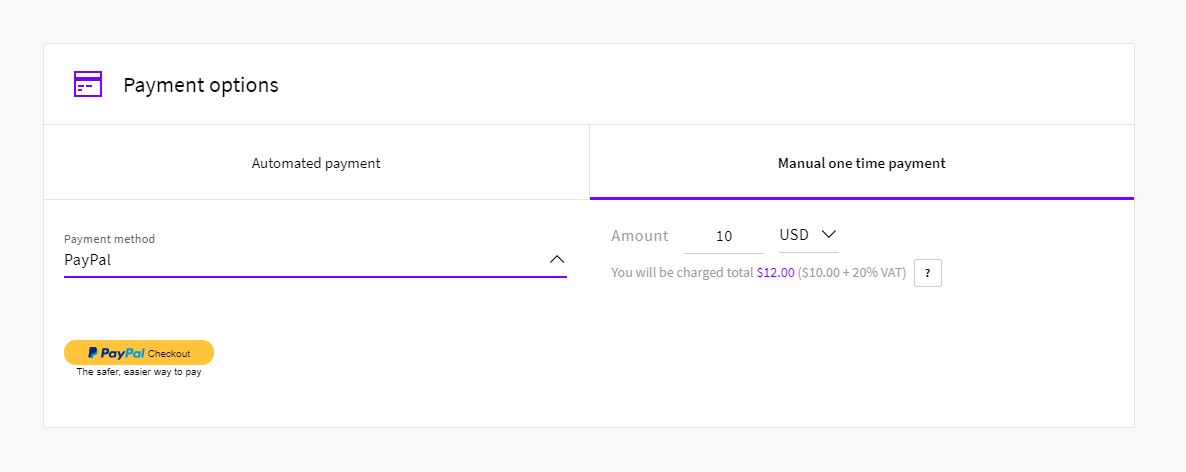
In the Manual one-time payment section, select PayPal as the Payment method. Once selected, you will see the familiar PayPal Checkout button.
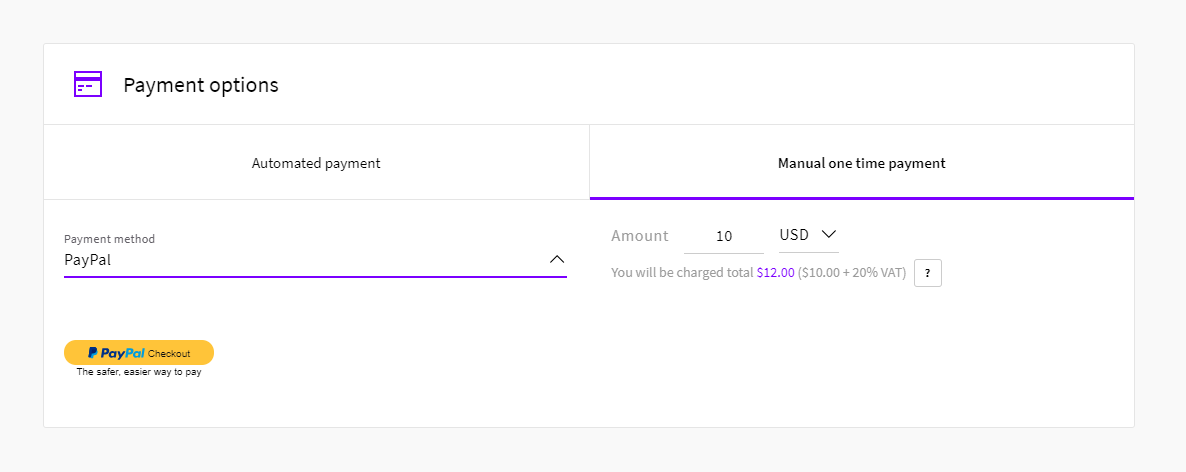
  1. Entered the amount you wish to add to your account in the second field and select your currency
  2. Below that, you can see the total payment including VAT, if applicable, and the amount that will be credited to your account in USD
  3. Next, click the PayPal Checkout button. This opens the PayPal interface in a new window.
Paypal payment

Then follow the instructions below to complete the balance transfer by either signing into your PayPal account or by proceeding as a guest without an account.

Existing PayPal users

Continue by logging into your PayPal account.
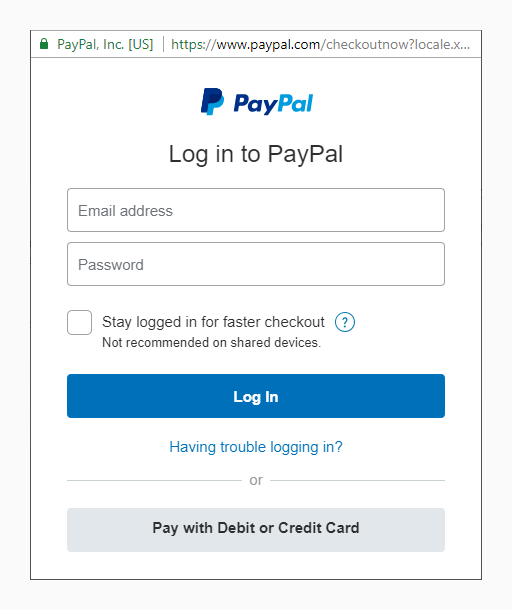
PayPal login window

Once logged in, you will see the payment methods you have saved on your account.

Choose the payment method you want to use. You can also add a new payment method to your PayPal account by clicking the plus sign and following the displayed instructions.

When ready, click the Continue button at the bottom to confirm the selection.
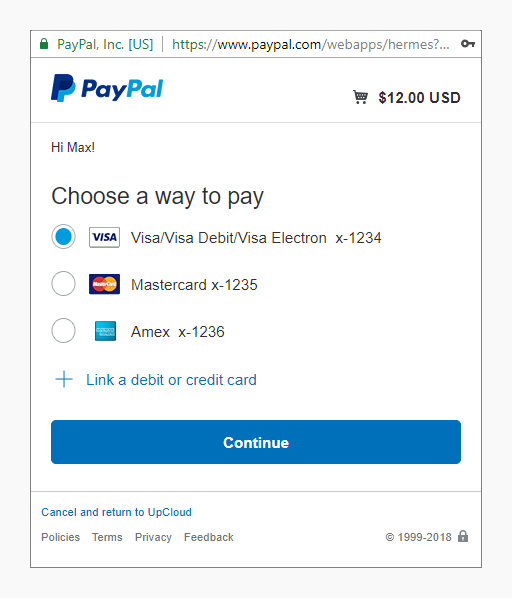
PayPal choose payment method

In the next screen, check that the transaction details shown are correct.

If everything is in order, confirm the payment by clicking the Pay Now button.
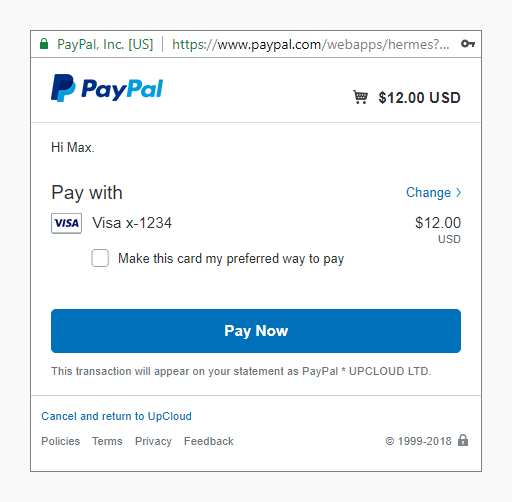
PayPal confirm payment

Once the payment has been processed, the PayPal window will close. You will then see a confirmation notification of the transaction in your UpCloud control panel and your new account balance.

Each payment will show on the Payment history list. You can also download previous invoices from the Billing page for your own records.
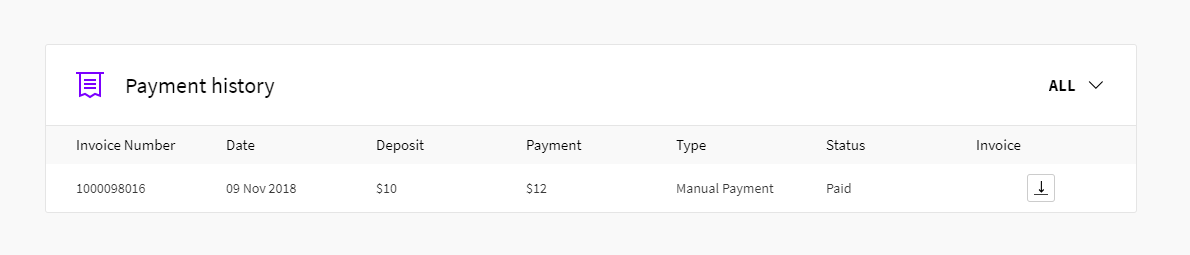
Payment history

If this payment was your first time adding balance to your UpCloud account, your account will then also have been upgraded for full access.

PayPal Guest Checkout

Optionally you can use PayPal Guest Checkout without an account.

Start the guest checkout by selecting Pay with Debit or Credit Card on the login screen. You will then be directed to the PayPal credit card form for guest checkouts.

PayPal login window

On the Guest Checkout screen, as with any other online payment, you will need to enter the following information to make the payment:

  1. payment method details
  2. billing address
  3. contact information

After entering the required information, click the Pay Now button at the bottom of the window to confirm the payment. The payment will then be processed.
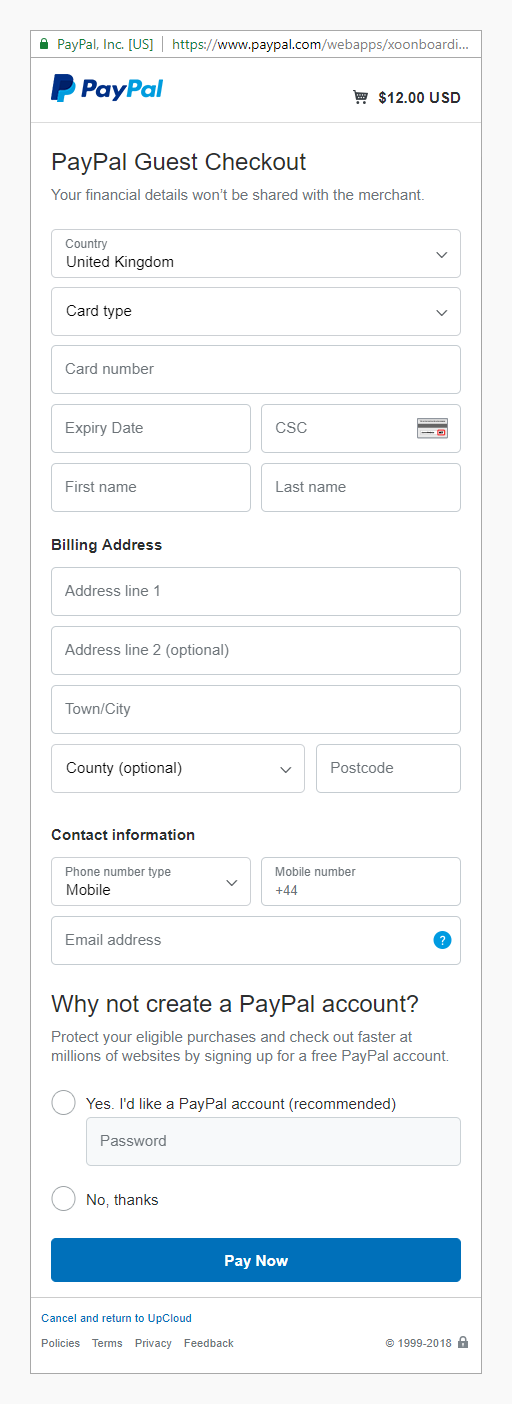
PayPal guest checkout

When completed, the PayPal window will close. You will then see a confirmation notification of the transaction in your UpCloud control panel and your new account balance.

The funds have then been credited to your UpCloud account and are ready to be used as you wish. If this payment was your first time adding balance to your UpCloud account, your account will then also have been upgraded for full access.

Important notes

Although adding balance to your UpCloud account using PayPal is easy and convenient, it does, however, include some limitations.

The funds are credited to your account in USD. If you are using a payment method in another currency than USD, PayPal will handle the conversion according to their exchange rates.


Discussion Join Discussion

  1. Hi Stafa, thanks for the question. You are right in that registration requires a valid credit card for identification purposes, but afterwards, you can use PayPal for any actual payments.

  2. Hi Luis, thanks for the question. We recommend you to verify your PayPal account to remove the initial account limitations. However, you can make payments via the PayPal Guest checkout without an account or verification.

  3. Hi there, if the PayPal transaction window is not opening, try disabling any adblocker you may use or try with a different web browser.

Leave a Reply to Tien Dung Cancel reply

Your email address will not be published. Required fields are marked *

Find out what makes our Cloud servers so boring

No? Experience the UpCloud special treatment and try our next generation, high-performance and resilient Cloud servers with no drama, worries or commitment.